The stages
Graphite was built in 27 stages, one builder each (design/build_stageN.py), every one taking the previous stage’s
image and writing the next (stage 3 was built on stage 1; stage 2’s typeface was part of it). Each went onto the
player and was tested before the next; History lists what went onto the player and when.
Release 1.0 is stage 27. Its build applies the final form of every change to the stock image in one go (Build system); the stage builders are in the git history. This page is the record of how the design came about; the column “Code” marks stages that changed program code.
Stage |
Changes |
Files |
Code |
|---|---|---|---|
1 |
start-up picture and main menu (nine entries) |
|
|
2 |
new typeface (Ubuntu, 12 px, 1 bit) |
|
|
3 |
typeface fixes; main menu down to five entries; Playlists first in the music menu; selected list row |
|
|
4 |
small shared pictures: status icons, battery, scroll bar, list marks |
|
|
5 |
Playlists tile in the main menu; Playlists second while playing; playing screen pictures |
|
yes |
6 |
Bluetooth search and shut-down animations, list icons, key lock, notices |
|
|
7 |
screensaver: night meadow and a hopping blob animation |
|
yes |
8 |
screensaver digits redrawn for the colour key; battery notice |
|
|
9 |
progress knob without flicker |
|
yes |
10 |
volume pop-up; brightness sun restored |
|
|
11 |
playing screen as in the mock; Sound settings in Settings; lyrics off; “Favorites” |
|
yes |
12 |
play/pause pictures swapped; track counter left |
|
|
13 |
track counter at x=22 (never flashed on its own) |
|
|
14 |
sideways copies of text backgrounds; tag title; status bar at once in Music |
|
yes |
15 |
main menu clock at the top left; screensaver key 0; the Berry theme |
|
yes |
16 |
eBook reader in landscape |
|
yes |
17 |
reader breaks lines between words |
|
yes |
18 |
“Add to playlist” writes the |
|
yes |
19 |
missing glyphs; only |
|
yes |
20 |
library follows the player’s changes; Remove from Playlist; Previous restarts the song |
|
yes |
21 |
playlist editing in the lists (add, delete, move); volume curve |
|
yes |
22 |
“Searching…” screen; status bar at once everywhere; track counter digits; card marks; screensaver date |
|
yes |
23 |
the picker’s page of five; Previous with the screen off |
|
yes |
24 |
the lists’ top line: menu names, list names, counter only in an album or playlist; short menu texts; status bar right after a list, its marks without a blink |
|
yes |
25 |
Search with a T9 keypad in the options of the music lists |
|
yes |
26 |
“Add songs” in the Playlists options: songs of the library by the keypad, to that playlist |
|
yes |
27 |
“New playlist” and “Rename” in the Playlists options: the name typed on the keypad, a new playlist goes on to “Add songs” |
|
yes |
Stage notes
1 to 4: pictures and type. Every picture keeps its size and place. Stage 2’s font: 512 glyphs replaced, wide
letters (M, W) use the two-byte row form, which the firmware reads correctly for ASCII. Stage 3’s main menu is a
change of one list in CONFIG.BIN (9 bytes); the music menu’s Playlists record was moved, not edited.
5: the Playlists tile. The first code change: MAINMENU.AP (the alarm entry starts music with code 0x40; grid
steps), MUSIC.AP (the root-menu routine skips the menu for 0x40, music_playlists_tile.S, checked on all 64 input
combinations).
6 to 8: animations and the screensaver. The screensaver clock turned out to be drawn by code, not by its layout;
stage 7 rewrote the start of the shared clock routine to draw one animation frame per 200 ms tick
(clock_sprite.S, in seven programs, 432 input combinations each). The colour key of the keyed draw (0xb5b6) then
explained damaged digits; stage 8 redrew them solid.
9 to 13: the playing screen. Stage 9 (music_progress.S, in the git history only) stopped the knob’s flicker; stage 11 rewrote the whole
time-and-bar routine (music_playing.S, 1336 combinations) and laid out the screen after the mock; stages 12 and 13
corrected the play/pause pictures and moved the counter out of the status bar’s corner.
14: three causes found in code. Scrolling text showed the stock background (the sideways copies); the title line
showed the file name (the tag reader overwrote the title, music_title.S); the status bar appeared half a second late
and its “black box” was the card mark (music_headbar.S; the playing screen got its own bar background with a note).
15: clock and Berry. The main menu clock moved to x=22 in the track counter’s lettering; the screensaver key became 0 in 15 programs, so the accent colon shows in every theme.
16 and 17: the reader. Landscape for the page only (ebook_reader.S, three stretches, 6400 combinations); stage
17 changed one mode number so lines end between words.
18 to 23: playlists on the player. New code in C (design/playlist/), placed in free bank room of MUSIC.AP.
18: add the playing song to an .m3u or a new playlist; the library builder reads the .m3u files at every run. 19:
glyphs, hide the built-in playlists. 20: write M3U.LIB in place, Remove from Playlist, correct engine messages, the
Previous key. 21: add from the song lists, delete songs and playlists, move songs, the volume table. 22: the small
items, among them the status bar at once in 14 more programs. 23: five rows per page, Previous with the screen off.
24: the lists’ top line. Menus lost the counter and show their name; menu texts that were wrong or too long got
short English forms (title and row alike); file lists show the level’s name, and the counter (in the
track counter’s digits) only inside one album, playlist or album folder (liststyle.c, compiled per program into
five programs); the status bar is drawn right after a menu or list (headbar_soon.S, 15 programs). Lists and menus
drawn with the bar on (0x6000, 0x6002 to 0x6005) paint their background from row 16 and clear only the bar’s middle
first (list_box, menu_box.S at the end of every bank with a list box call, the playlist picker); the battery,
card and Bluetooth marks got a black border out to the bar’s edges, so the bar repaints rows 0 to 15 and the marks
no longer go out while a list is drawn.
25: search. Menu → Search in Playlists, All songs, Artists, Albums and Genres, at any level, opens a phone keypad
over that level’s rows (search.c): one key per letter, as T9 did; a row matches when the keys spell the beginning of
one of its words. The query line shows the letters the first match spells and the number of matches, four result
lines below it, the keypad at the bottom. A chosen row opens as Select opens it, or plays, and the list stands on it
afterwards. The option lists got a “Search” row (text 44, icon 107, a stock routine that returns 0x8606) and were laid
out anew in the room of the built-in playlists’ options.
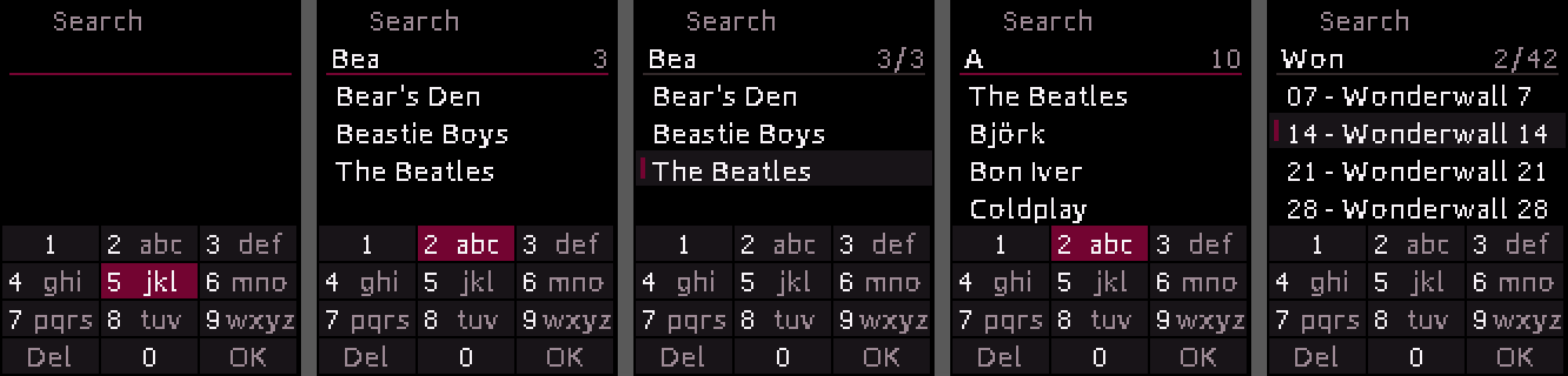
The search screen as the host test draws it (Berry, design/playlist/host/render.py; the status bar’s marks are
the firmware’s and not drawn here).
26: Add songs. In a playlist, or on one in the list of playlists, Menu → “Add songs” opens the same keypad over
all songs of the library, as All songs lists them (read from MUSIC.LIB). Play on a result adds that song to the end
of the playlist with the stock message, and the keypad comes back with the same keys and the same line chosen, for
the next song: it shows at once the letters and the chosen song, which Play adds right away, and the other lines as
the songs are found again; Return leaves, and the playlist shows the new songs. The code no longer fits the 0x1000 group’s bank
tails: the parts only “Add songs” runs went into tails of the 0x1a00 group.
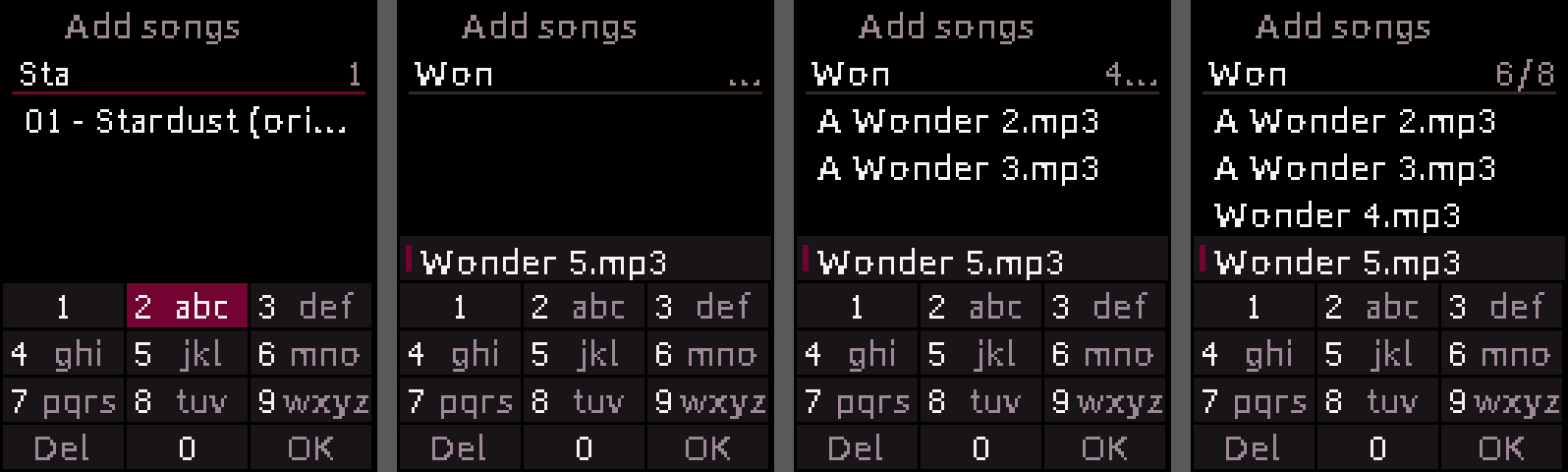
“Add songs” as the host test draws it (Berry): 7-8-2 typed; at once after the sixth of eight “Wonder” songs was added, the chosen song on its line; four found again; all eight.
27: New playlist, Rename. The Playlists options have two more rows behind “Add songs”. “New playlist” asks for a
name and makes <name>.m3u in the root folder with its record in M3U.LIB, then opens “Add songs” for it; in the
list of playlists the list stands on the new one afterwards. “Rename”, on a playlist in the list of playlists or
inside one, asks for the new name with the old one filled in. The name is typed on the search’s keypad as on a phone
before T9 (name.c): Play on a key types its first letter, Play again within a second takes the next one in its place
(2: a, b, c, 2), held it types the digit; 1 has - . & ' ( ) !, 0 the space. Under the name, the chosen key’s
characters in a row, the one being typed marked, and the letter case on the right: “Abc” (a capital at the start and
after a space), “abc” or “ABC”, switched by Menu; the keys keep their small letters (“PQRS” and “WXYZ” are wider than
their place). Del and Return delete the last character, held all of them; Return on an empty name leaves; OK takes
the name without spaces at its ends. A name has at most 26 characters, as many as its record holds; a name another
playlist has (the letter case aside) brings a message and the screen again. The file system’s own rename (command
20) is used by no stock program, so it is not relied on: a rename copies the file under the new name, a piece at a
time with one file open, removes the old one and gives the record the new name and place; a change of the letter case
alone goes through a name with a “~” in front, since the file system takes the new name for the old one. The code no
longer fits the 0x1000 group’s tails: the name screen, both actions, “Move song” and “Delete” went into tails of the
0x1a00 group.
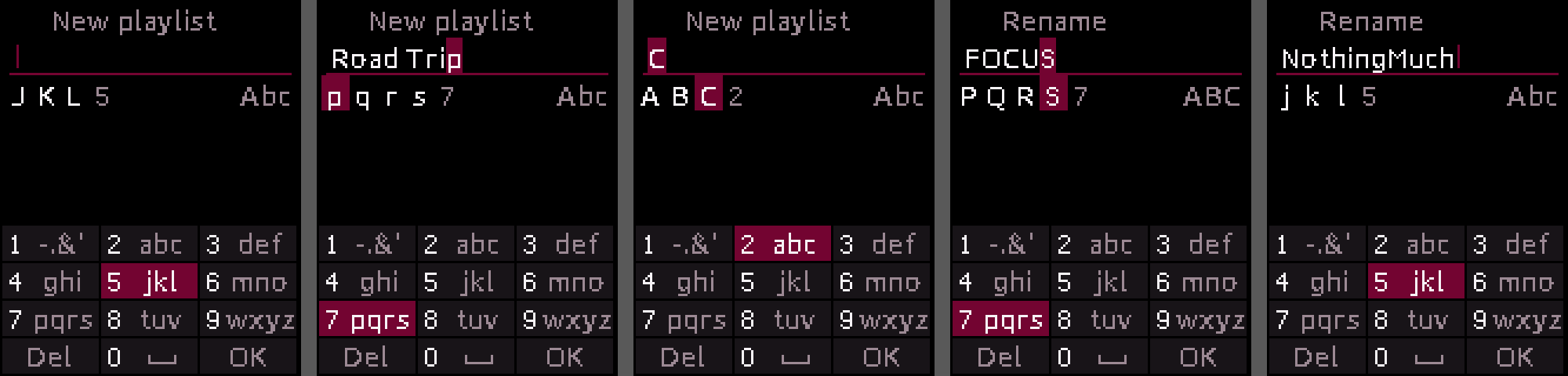
The name screen as the host test draws it (Berry): “New playlist”, empty; “Road Trip”, the p still being typed on 7 (its row p q r s 7 below); three presses of 2 give C; “Rename” in capitals; “Rename” as it opens, the old name filled in.